How to profile ACE services
Prerequisites
In WSL2 bash shell run:
sudo apt install apache2-utils
Starting service in inspection mode
To profile the service it must be started in inspection mode.
For example to run flow manager in inspect mode add this script to flow-runner-service package.json
"inspect": "cross-env NODE_ENV=development nodemon --exec ts-node-dev --inspect --project ./tsconfig.development.json -r tsconfig-paths/register src/server",
Then run it
yarn inspect
Profiling the service
Open profiler
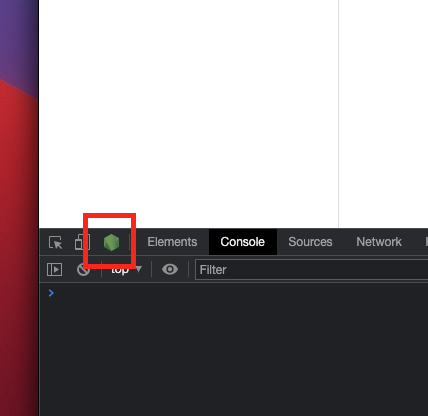
Once service is running in inspection mode, open Chrome and click on Node DevTools icon.
Start profiler
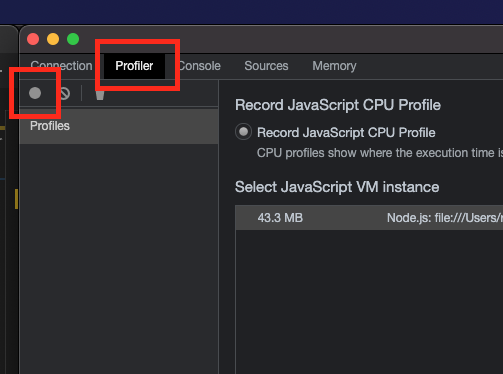
To profile the service open Profiler tab and start the profiler.
Run benchmarking tool
For example to run this flow (you can obtain flow source by exporting it in the flow manager)
{
  "doc": {
    "path": "one"
  },
  "flow": {
    "steps": [
      {
        "stepType": "rest-new",
        "color": "rgb(247,225,211)",
        "displayName": "REST Http",
        "isSelected": true,
        "config": {
          "endpoint": {
            "method": "GET",
            "url": "https://test-node-portal-api.herokuapp.com/get/{{path}}"
          },
          "queryParams": {},
          "headers": {},
          "restRequest": "JSON",
          "expectedResponseLocation": "body",
          "oAuthConfig": {},
          "json": {},
          "targetPath": "result",
          "cacheble": false
        }
      },
      {
        "stepType": "jsonata",
        "color": "rgb(245,210,211)",
        "displayName": "JSONATA Map",
        "isSelected": false,
        "config": {
          "maps": [
            {
              "mergeArrayItems": {},
              "jsonata": "{\n\"name\":\"ACE\"\n}",
              "targetPath": "result"
            }
          ]
        }
      }
    ]
  },
  "args": {
    "debugMode": false
  }
}
with 10 concurrent users, in total 100 times (every concurrent user will run it 10 times).
Save it to file heroku.json and execute
ab -T application/json -c 10 -n 100 -p heroku.json http://localhost:3000/flow/executeFlow
This should produce meaningful averages for 10 concurrent users
Time taken for tests:   10.899 seconds
Complete requests:      100
Failed requests:        0
Total transferred:      39500 bytes
Total body sent:        120200
HTML transferred:       5800 bytes
Requests per second:    9.18 [#/sec] (mean)
Time per request:       1089.910 [ms] (mean)
Time per request:       108.991 [ms] (mean, across all concurrent requests)
Interesting details here are that it takes 1s (duration) for a single request to execute, but with 10 concurrent users requests executing in parallel it is possible to execute roughly 10 requests per second.
To understand profile a bit better you can run ab with one user.
ab -T application/json -c 1 -n 1 -p heroku.json http://localhost:3000/flow/executeFlow
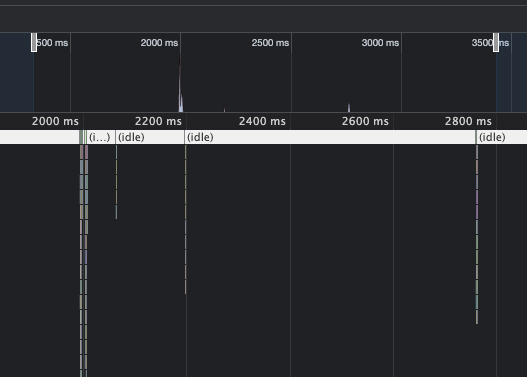
Stop profiler and analyze the performance
Zoom in timeline:
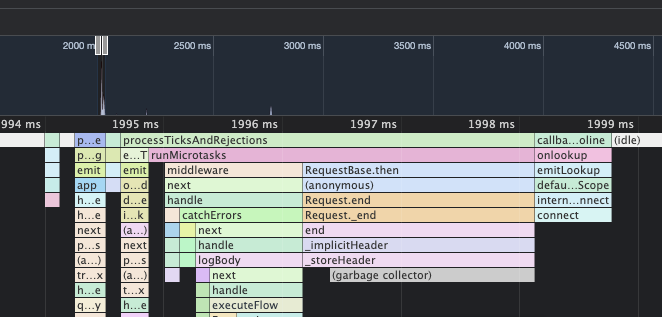
Flow manager processed request in 5ms and proceeded to wait for the response from the remote endpoint...
Performance Logs
To enable Flow Runner performance logs, set LOG_LEVEL to debug.
Relevant information in performance logs is:
uniqueId- unique flow execution Id, to track steps in the flow executionexecution time of each step (ms)total execution time of flow (ms)
Example logs:
{"timestamp":"2021-09-15T13:46:04.684Z","level":"debug","application":"flow-runner","message":"Flow-runner-lib - Execution time of step: 'testFlow' step: rest-new description:  -  988(ms),  uniqueId: uniqueId-Rmxvd05hbWU6IG51bGwgVGltZXN0YW1wOiAxNjMxNzEzNTYzNTMx","metadata":{}}
{"timestamp":"2021-09-15T13:46:04.716Z","level":"debug","application":"flow-runner","message":"Flow-runner-lib - Execution time of step: 'testFlow' step: date description:  -  24(ms),  uniqueId: uniqueId-Rmxvd05hbWU6IG51bGwgVGltZXN0YW1wOiAxNjMxNzEzNTYzNTMx","metadata":{}}
{"timestamp":"2021-09-15T13:46:04.723Z","level":"debug","application":"flow-runner","message":"Flow-runner-lib - Execution time of step: 'testFlow' step: jsonata description:  -  6(ms),  uniqueId: uniqueId-Rmxvd05hbWU6IG51bGwgVGltZXN0YW1wOiAxNjMxNzEzNTYzNTMx","metadata":{}}
{"timestamp":"2021-09-15T13:46:04.725Z","level":"debug","application":"flow-runner","message":"Flow-runner-lib - Execution time of step: 'testFlow' step: clean-object description:  -  0(ms),  uniqueId: uniqueId-Rmxvd05hbWU6IG51bGwgVGltZXN0YW1wOiAxNjMxNzEzNTYzNTMx","metadata":{}}
{"timestamp":"2021-09-15T13:46:04.727Z","level":"debug","application":"flow-runner","message":"Flow-runner-lib - Execution time of flow: 'testFlow' - 1032(ms), uniqueId: uniqueId-Rmxvd05hbWU6IG51bGwgVGltZXN0YW1wOiAxNjMxNzEzNTYzNTMx","metadata":{}}
Load tests
To measure end-to-end system performance under tha stress, it is necessary to create a dynamic API and a simple Flow without external dependencies.
Flow
This flow will echo back to API that ever is the input.
{
  "name": "echo",
  "flow": {
    "name": "echo",
    "description": "",
    "steps": [
      {
        "stepType": "jsonata",
        "color": "rgb(245,210,211)",
        "displayName": "JSONATA Map",
        "isSelected": true,
        "config": {
          "maps": [
            {
              "mergeArrayItems": {},
              "jsonata": "$",
              "targetPath": "result"
            }
          ]
        }
      }
    ]
  },
  "inputSchema": {},
  "createDate": "2021-10-04T15:22:47.941Z",
  "tags": [
    "general"
  ],
  "inputSchemaLabel": "",
  "version": 1
}
API
{
  "openapi": "3.0.0",
  "info": {
    "version": "1.0.0",
    "title": "Dynamic apis",
    "description": "List of dynamic apis"
  },
  "paths": {
    "/v1/echo": {
      "post": {
        "tags": [
          ""
        ],
        "summary": "",
        "responses": {
          "200": {
            "description": "",
            "content": {
              "application/json": {},
              "application/xml": {}
            }
          }
        },
        "parameters": [],
        "requestBody": {
          "description": "body param generated from provided JSON request example",
          "required": true,
          "content": {
            "application/json": {
              "schema": {
                "type": "object",
                "example": {}
              }
            },
            "application/xml": {
              "schema": {
                "type": "object",
                "example": {}
              }
            }
          }
        },
        "operationId": "4a632b29-15b2-4393-9b82-3461664d8f80"
      }
    }
  },
  "components": {
    "schemas": {}
  }
}
Benchmark
testme.json
{
 "test":"me"
}
Run load test (100 concurrent users, each doing 10 requests).
ab -T application/json -c 100 -n 1000 -p testme.json http://localhost:3000/v1/echo
With this simple API/Flow, performance should be roughly 20ms per request.
Time taken for tests:   17.578 seconds
Complete requests:      1000
Failed requests:        0
Total transferred:      344000 bytes
Total body sent:        161000
HTML transferred:       13000 bytes
Requests per second:    56.89 [#/sec] (mean)
Time per request:       1757.845 [ms] (mean)
Time per request:       17.578 [ms] (mean, across all concurrent requests)